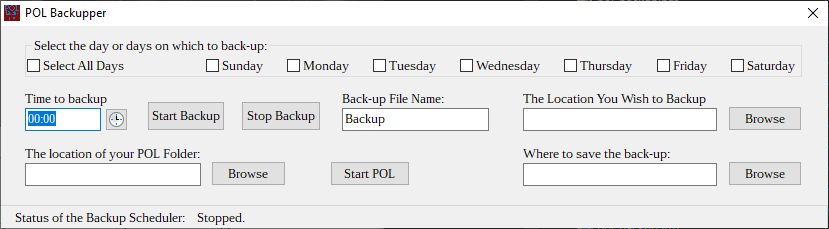
It is fairly straightforward in its use. Set the time using the clock component. Times are in 24-hour format. Choose the days you wish to have the back-up performed, or check the Select All Days check box. Set the directories as mentioned above, and click the Start Backup button. Should you need to interrupt the scheduler, click the Stop Backup button. I have even provided the ability to start the POL server from within the POL Backupper.
I should note that the POL Backupper will archive all subdirectories under the location you wish to backup. So you may choose to back-up your entire server or just the /data directory.
Here is a screenshot of the interface:
This program is Open Source. It is licensed under the GPL version 3 FOSS license.
Here is the link to the GitHub repository.
As it is written using the Lazarus IDE and Designer using the Free Pascal programming language I have included the Windows binary in the repo. There is no need to install Lazarus if you just want to use the programme.