Page 1 of 1
Health bar comes up on objects.
Posted: Fri Jul 14, 2006 12:46 pm
by Yukiko
OK I had this problem resolved once but since the 96.1 release (I think) this has cropped up again. When I double click an item, like a corpse or a box, I get a health bar on that item. Is there a setting in serverspecopt that I missed?
Thanks in advance.
Posted: Fri Jul 14, 2006 1:50 pm
by CWO
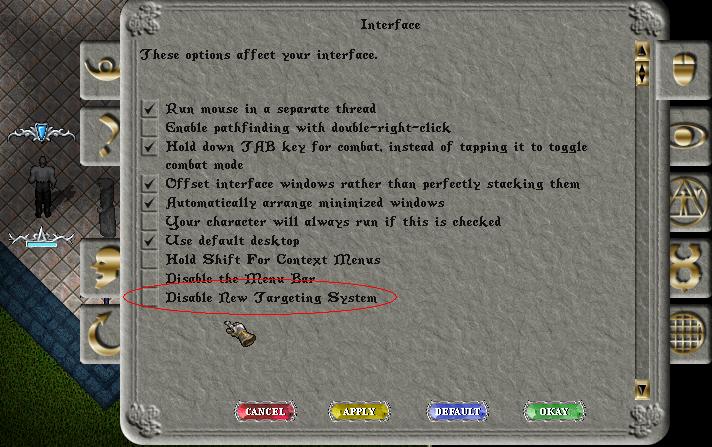
Are you using the latest clients? You might be experiencing the stupid new targeting rectile system in the clients. Go to your Interface Options on the client (the little mouse icon) and put a check in Disable New Targeting System.
Posted: Sun Jul 16, 2006 12:43 pm
by Yukiko
Using client version 5.0.2 Patch 13
Didn't find that item in the options menu.
Posted: Sun Jul 16, 2006 5:58 pm
by CWO
Its on 5.0.2 clients... are you patched to it or are you just using the client?
Posted: Mon Jul 17, 2006 12:53 pm
by Yukiko
I patched.
Here are the options I have in my "Interface" configuration sub-menu in the "Options" menu with their current settings.
( 'V' indicates checkbox that is checked. '_' indicates unchecked checkbox. 'o' indicates disabled radio button and '*' indicates radio button enabled.)
Run Mouse in seperate thread.
V - Enable pathfinding with double-right-click
_ - Hold down TAB key for combat instead of tapping it to toggle combat mode
V - Offset interface windows rather than perfectly stacking them
V - Automatically arrange minimized windows
_ - Your character will always run if this is checked
V - Use default desktop
_ - Hold Shift for context sensitive menus
V - Disable menu bar
Item Properties Display Mode
o - At Icon
o - Always Up
* - Follow Mouse
o - Single Click
_ - Display Item Properties Icon
V - Object Handles
Posted: Mon Jul 17, 2006 5:07 pm
by CWO
Is that 3D? On the 2D client its just after Disable menu bar...
Posted: Mon Jul 17, 2006 5:27 pm
by Yukiko
2D
Posted: Mon Jul 17, 2006 9:51 pm
by CWO
Ahh just looked it over on uo.com. You need to patch further to disable it. They did fix many of the issues with the targeting system and added that option to disable it in newer patches. Just posting a screenshot of what it looks like to have it enabled and the option to disable it... This screenshot was taken on version 5.0.2g patch 20
Posted: Tue Jul 18, 2006 1:01 pm
by Yukiko
OK. I'll restore to my virgin UO: ML zip file then let that patch up. I have some customized graphics files so it refuses to patch me up any further with what I have in my UO folder.
Thanks CWO for the help.
Posted: Tue Jul 18, 2006 10:19 pm
by Yukiko
Thanks CWO.
I copied my virgin ML install, ran UO Patch and it fixed my peoblem.
FYI makes no dif whether it's enabled or disabled. Must have had some wierd in-between patch. I have had reports from players/staff that sometimes EA Games patch doesn't complete. Might have happened to me too.
Anyway, thanks.
Posted: Tue Jul 18, 2006 10:47 pm
by CWO
that whole brace thing disables for me if I have it disabled. Health bars appeared on items in 5.0.2 but shouldnt if patched after.